What is AI dictation?
Speech-to-text plus a language model that cleans up what you say as you say it. Here's how the pipeline works, what the real numbers look like, and who actually needs it.
AI dictation is speech-to-text that uses a large language model to clean up what you say as you say it. You speak naturally — half-sentences, filler words, corrections mid-thought — and what lands on the page is finished text: punctuated, grammatical, formatted for where you're writing.
That second step is the whole difference. Classic dictation transcribes your words literally, so you end up editing everything you dictate. AI dictation removes the editing pass, which is what finally makes speaking faster than typing in practice, not just in theory.
How AI dictation works
Every AI dictation tool is a pipeline with two stages:
1. Speech recognition (ASR). A speech model converts your audio into raw text. Modern ASR models handle accents, technical vocabulary, and multiple languages — including switching languages mid-sentence — far better than the dictation built into operating systems, which was designed for short commands rather than continuous thought.
2. LLM clean-up. A language model rewrites the raw transcript the moment you finish speaking: it drops the "um"s and false starts, applies your corrections ("no wait, make that Thursday"), fixes punctuation, and shapes the result — an email reads like an email, a code comment stays terse, a chat reply stays casual.
Some tools add a third stage: routing. The clean-up style switches automatically based on the app you're dictating into, so you don't reformat by hand or toggle modes.
What it's like in numbers
Speaking is roughly three times faster than typing. A comfortable typist does 40–60 words per minute; conversational speech runs 130–160. With clean-up handled by the model, that speed actually survives contact with real work.
Some real usage data, from my own archive as the maker of Acousmos (as of July 13, 2026): 11,669 dictations, 495,000 words spoken, an average of 188 words per minute, and an estimated 162 hours saved compared to typing the same text. That's not a benchmark — it's one person's daily use across email, documents, chat, and prompts for AI tools.
What people use it for
- Email and messages — reply at speaking speed; the model shapes each reply for the app it lands in.
- First drafts — talk through a document the way you'd explain it to a colleague, then edit a coherent draft instead of a blank page.
- Prompts for AI tools — long, detailed prompts are painful to type and natural to say.
- Notes and journaling — capture thoughts at the speed you think them, before they fade.
- Working through pain — for people with RSI, tendonitis, or other typing limits, dictation isn't a productivity trick; it's what makes a full workday possible.
Where the words go: the question nobody asks
Most dictation tools treat your speech as disposable input: text is delivered, audio is discarded, and last month's dictated idea is gone.
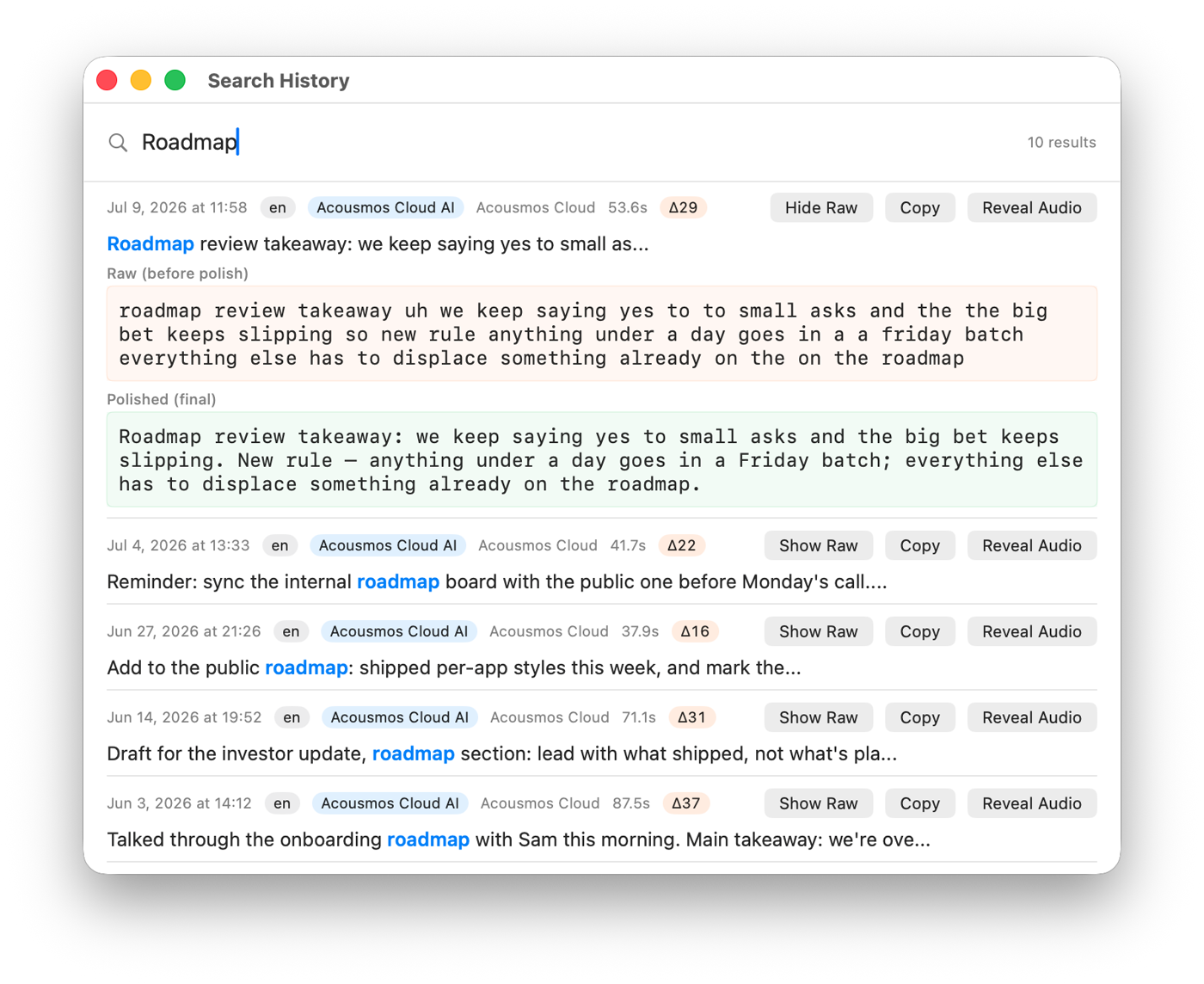
This is worth checking before you choose a tool, because your dictation history is surprisingly valuable — it's a record of your thinking in your own words. Acousmos is built around this idea: every dictation, original audio plus text, is saved to a permanent archive on your Mac with full-text search. The plan you talked through in a meeting last quarter is three seconds away, replayable in your own voice. The archive is an open format you can export any time, and it stays on your machine whether or not you keep a subscription.
Privacy: the three questions that matter
AI dictation involves a microphone and, usually, a cloud model, so ask three specific questions of any tool:
- Where does transcription happen? Cloud transcription is typically the most accurate; some tools also offer fully local models (works in airplane mode) or let you bring your own API key so audio only passes through a provider you chose.
- Is your speech stored or trained on? Read the actual policy, not the homepage badge. "Never collected, never trained on" is the answer you want.
- Where does the resulting text live? On your machine in a format you can export, or in someone else's database?
Is AI dictation right for you?
Honest answer: not always. If you write a few short messages a day, built-in dictation on your phone or computer is free and fine. Dictation is also awkward in open offices and useless in loud environments. And no tool fixes an unformed thought — speaking speed just gets you to the editing stage sooner.
It pays off when you write a lot — email, documents, prompts, notes — or when typing itself is the bottleneck, whether that's speed or pain.
Try it with your own voice
The fastest way to understand AI dictation is to hear your own words come back as clean text. You can test the engines in your browser — no install, no signup — at acousmos.com/arena. Acousmos itself runs on Apple Silicon Macs (macOS 14+) with a one-month free trial, no account required.
Common questions
What's the difference between AI dictation and regular dictation?
Regular dictation transcribes literally, so you edit afterward. AI dictation adds an LLM that removes filler, applies your spoken corrections, and formats the text for its destination — the editing pass disappears.
How fast is dictation compared to typing?
Conversational speech is 130–160 words per minute versus 40–60 for typing. Real-world usage data from the Acousmos archive averages 188 words per minute across 11,669 dictations.
Does AI dictation work offline?
Depends on the tool. Cloud transcription needs a connection; some tools, including Acousmos Pro, can run fully local models so dictation works in airplane mode.
Is dictation private?
It varies more than any other feature. Check where transcription happens, whether speech is stored or used for training, and where the text ends up. Acousmos keeps the archive local to your Mac, never collects what you say, and offers bring-your-own-key and local-model options.
Can I dictate in Chinese, or switch languages?
Modern ASR handles 100+ languages and mixed-language speech (like Chinese with English terms). Some tools also translate as you speak — in Acousmos you set a target language once, speak Chinese, and English lands at your cursor.
Apple Silicon · macOS 14+ · no signup, no card